Microsoft has never been accused of making its product names easy to follow, and the Copilot family might be the best example yet. There's Copilot Chat, Copilot inside Word and Excel, and now Copilot Cowork, which went generally available in June. They all carry the same name, they all live inside Microsoft 365, and they work in genuinely different ways. When clients ask us about "getting Copilot," the first thing we usually have to figure out is which one they mean.
So here's the plain-English version of what separates Chat from Cowork, what each one costs, and how to decide which one your business actually needs. Short version: they're not competitors. One is included with your Copilot license, the other is an add-on billed by usage, and most businesses that end up using Cowork started by getting comfortable with Chat first.
What Copilot Chat Is
Copilot Chat is the conversational side of Microsoft 365 Copilot, and it's what most people picture when they hear the name. You ask a question or make a request, it gives you an answer or a draft, and then you take it from there. Because it's connected to your Microsoft 365 environment, it can pull from your emails, files, meetings, and chats to ground its answers in your actual work, not just general knowledge.
The same license also puts Copilot directly inside the apps your team lives in. It drafts documents in Word, builds formulas and analyzes data in Excel, generates slides in PowerPoint, summarizes long email threads in Outlook, and recaps meetings in Teams.
The important part for this comparison: everything above is included in the Microsoft 365 Copilot license at $30 per user per month. Flat fee, no meters running. You can use Chat fifty times a day and the bill doesn't change.
What Copilot Cowork Is
Cowork is the newer piece, and it works on a different model entirely. Instead of asking a question and getting a response, you hand it an outcome and it goes and does the work. It plans the steps, works through them across your Microsoft 365 environment, and comes back with a finished result rather than a draft for you to run with.
That can mean building a set of documents and a deck from the material scattered across your inbox, running a research project that pulls from multiple sources, cleaning up your calendar, or drafting and sending a round of stakeholder emails. It asks for your approval before it takes meaningful actions like sending a message. And because it runs in Microsoft's cloud rather than on your machine, a task keeps going after you close your laptop.
The difference shows up in the bill, too. Cowork isn't included in the $30 license; it's billed on top, based on usage. Every task consumes what Microsoft calls Copilot Credits, at a penny per credit under pay-as-you-go pricing. Microsoft's published tiers put a light task at roughly $1 to $3, a medium task at $4 to $7, and heavy multi-output work at $7 and up. We covered the full pricing model, and the spending controls that should go with it, in our Copilot Cowork pricing breakdown.
The Real Difference, In One Sentence
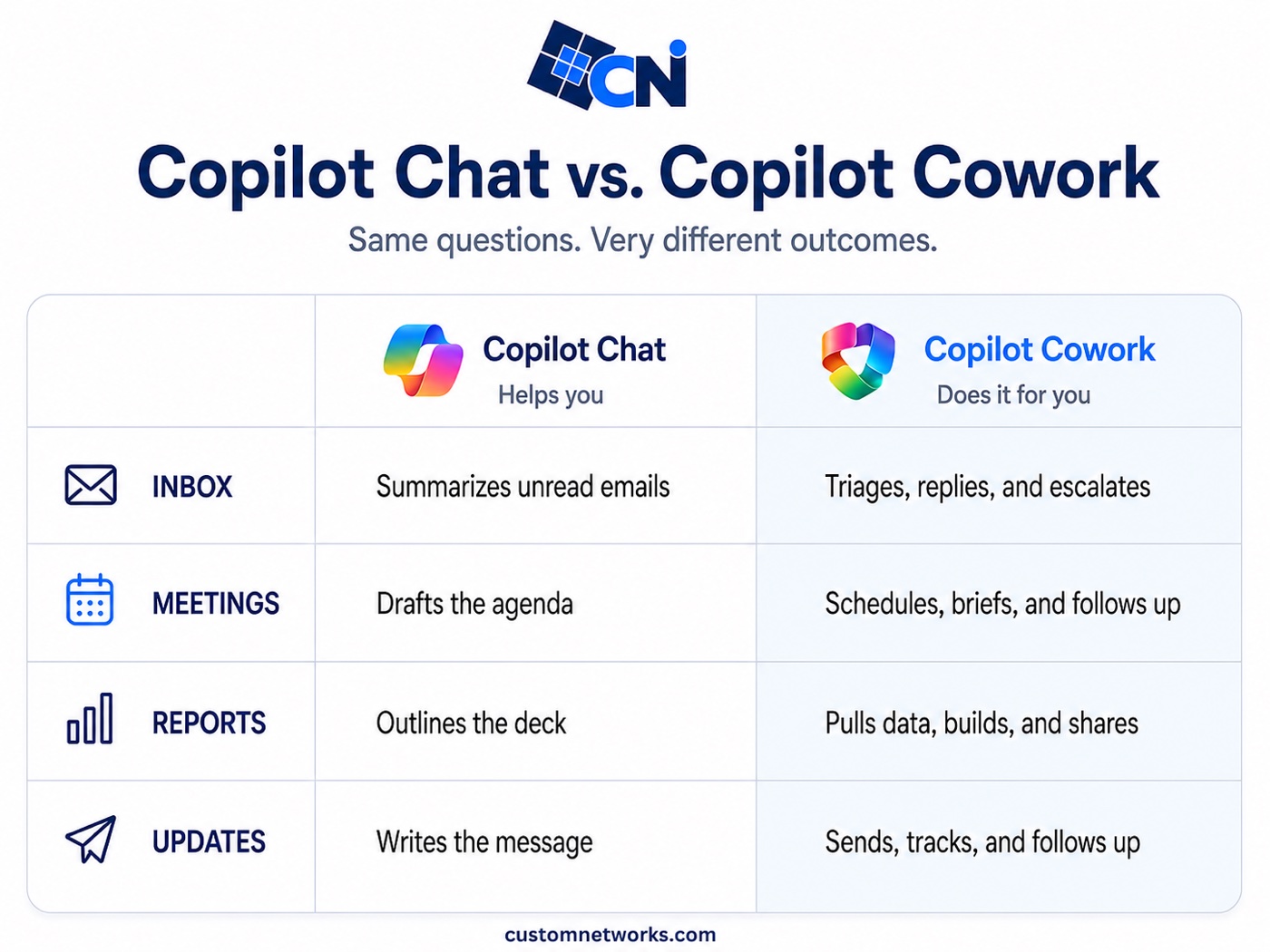
Chat helps you do your work. Cowork does work for you.
That sounds like marketing language, but it's the honest distinction, and it's why the two are priced so differently. When you use Chat, you're still the one driving: reading the draft, fixing it, deciding what happens next. When you hand Cowork a task, you're delegating, the way you'd delegate to a person, and you review the finished product instead of every intermediate step.
When Chat Is Enough
For most employees, most of the time, Chat is the right tool, and for plenty of businesses it's the only one they need for now.
If the work is a single step with you in the middle of it, Chat covers it: drafting an email, summarizing a document, building a formula, prepping for a meeting, turning notes into slides. The fixed cost also makes it the easy place to start. Rolling out Chat costs you exactly what the license costs, so there's no usage to monitor and no budget conversation beyond the per-seat math. And frankly, most teams need a few months with Chat before they can even tell you what they'd delegate to Cowork. You have to build the habit of working with AI before handing it whole tasks makes sense.
When Cowork Earns Its Keep
Cowork starts making sense when you can name specific, recurring chunks of work that eat hours and follow a pattern. A few examples from the kinds of roles where we see it fit: an operations person who assembles the same weekly status package from emails, spreadsheets, and project notes. A sales lead who needs research briefs on prospects before every discovery call. An executive assistant managing calendars, follow-ups, and meeting prep across several people. In cases like these, the math is easy to run. If a $5 task replaces an hour of assembly work, the task pays for itself many times over. Our free Cowork cost calculator turns your team mix into a monthly estimate, so you can see the numbers before anything gets enabled.
The pattern we recommend, and the one Microsoft's own rollout controls are clearly designed for, is to start narrow. Pick a handful of people whose work fits, set per-user spending caps and alerts before anyone runs their first task, and look at the usage reports after a month. Cowork is off by default in every tenant, so nothing happens until your admin deliberately turns it on, which is your opportunity to put the guardrails in place first.
It's Not Either/Or
One point of confusion worth clearing up: you can't choose Cowork instead of the Copilot license. Cowork requires it. The $30 seat is the foundation, and Cowork's usage billing sits on top for the people who need it.
In practice, that makes the decision less complicated than it looks. The question isn't "Chat or Cowork?" It's "who on the team gets a Copilot license?" first, and then, "which of those people have delegation-shaped work that justifies enabling Cowork?" For most small and mid-sized businesses, the honest answer to the second question right now is a few people, not everyone, and that's fine. Usage-based pricing means the people who don't use it cost you nothing extra.
Where to Start
If your business hasn't touched either one, start with Chat for the people who spend their days in email, documents, and meetings, and let them build the muscle for a quarter. If Chat is already part of the routine and your team can point to specific tasks they wish they could hand off entirely, that's the signal Cowork is worth a pilot, with the spending caps configured on day one.
And if you're not sure where your team lands on that spectrum, that's a normal place to be. This stuff has changed a lot in the past year, and it'll keep changing.
Common Questions About Copilot Chat and Cowork
What is the difference between Copilot Chat and Copilot Cowork?
Chat helps you do your work; Cowork does work for you. With Chat you ask a question and get an answer or draft that you act on. With Cowork you hand over an outcome and it plans and completes the whole task across Microsoft 365, returning a finished result.
Is Copilot Cowork included in the Microsoft 365 Copilot license?
No. The $30 per user per month Copilot license includes Chat and Copilot inside the Office apps at a flat fee. Cowork is billed on top based on usage, at a penny per Copilot Credit under pay-as-you-go pricing, with most tasks running between $1 and $7.
Can I buy Copilot Cowork without the Copilot license?
No. Cowork requires the Microsoft 365 Copilot license as its foundation, and its usage billing sits on top for the people who need it. The real question is who gets a Copilot license first, and then which of those people have delegation-shaped work that justifies enabling Cowork.
Should my business use Copilot Chat or Cowork first?
Start with Chat for the people who spend their days in email, documents, and meetings, and let them build the habit for a quarter. Once your team can point to specific recurring tasks they wish they could hand off entirely, that is the signal Cowork is worth a pilot, with spending caps configured on day one.
Want a second opinion before you buy anything?
CNI helps businesses figure out who actually needs a Copilot license, whether Cowork is worth enabling, and how to set it all up with the right controls from the start. No pitch, no pressure.
Sources: Microsoft 365 Blog: Copilot Cowork is now generally available (June 16, 2026); Microsoft Learn: Copilot Cowork overview; Microsoft: Copilot Cowork product page; Quisitive: Copilot Cowork Pricing 2026. Pricing current as of July 2026.